↓
 

Mrs. Moore's Advisory 🙌

Robotics

  • Home
  • Exploratorium
  • Class Operations
    • Submit a Rework
    • Just Ask!
  • CTE Standards
    • Work Place Ready Skills
    • ETE Standards
<< 1 2

Author Archives: Sarah LaMarche

Post navigation

Newer posts →

Week 5 | Sept 15 – Sept 19

Mon | Sept 16

Welcome to Class!

Please excuse Mrs. Moore she is a Basic Training.

Today we are going to be learning about ISOMETRIC SKETCHING

  • Talk about and write vocab in Engineering Notebook.
  • Click HERE for the ISOMETRIC BLOCK CHALLENGE SLIDES - please make a COPY of the slide show and share it with your team members.


View Full Page

Tue | Sept 17

This content is password-protected. To view it, please enter the password below.

View Full Page

Wed | Sept 18

Welcome To Class - Today we are going to review ISOMETRIC SKETCHING

We will start class by doing a WHITE BOARD REVIEW

Then we are going to LEVEL UP and draw isometric sketches of mutliple blocks


You will LEVEL UP again to work on an ISOMETERIC sketch of the letters in your first name
Click HERE to for ISOMETRIC alphabet resources you can use

View Full Page

Thur | Sept 19

Welcome to Class!!  We will make our way to S3 today 

You MUST Finish Isometric Hand Sketches before you can get on the computer.

 LEVEL 2 : Are you finished drawing isometric sketches of mutliple blocks


LEVEL 3: Have you created an ISOMETERIC sketch of the letters in your first name
                  Click HERE to for ISOMETRIC alphabet resources you can use


LEVEL 4: Create Isometric sketches on Fusion 360:
  • Make sure you can log into Fusion 360

  • Click HERE to access Get 2 know Fusion 360 BASICS and instructions for ISOMETRIC sketches

View Full Page

Fri | Sept 20

Welcome to class! - We are in S3 Today!

We are going to learn about CONSTRAINTS and then:

  • Finish Isometric hand sketches

  • Fusion 360 - Make shapes and a Isometric sketch of your name

  • Update Week 5 in your portfolio

View Full Page

Week 4 | Sept 8 – Sept 12

Mon | Sept 8

Welcome to class!

Today we are going to:

  • Talk about precision vs accuracy

  • Finalize our Fling Machine Projects

  • Start project presentations

View Full Page

Tue | Sept 9

This content is password-protected. To view it, please enter the password below.

View Full Page

Wed | Sept 10

Welcome to Class!!

1. Update you Portfolio

  • Week 3 needs completed - you should have the days of the week, with explanation of what you did in class that day.

    • Tuesday or Wednesday should have a link to you completed CAREER ASSIGNMENT

  • Week 4 should have all the days of the week, with Monday - Wednesday filled in

    • Mon or Tue should include a link to your Fling Machine Project

2. Today we will be learning about sketching.

How are sketches used and what are some tips when creating sketches!    Get ready to DRAW!!! Click HERE to look at slide show about what we learned.


View Full Page

Thur | Sept 11

Welcome to Class!

 Sign for Fusion 360 Account 

  • Check your school email for your invite to set up your account.

  • Explore in Fusion to create a shape.

    • Click HERE for instructions


View Full Page

Fri | Sept 12 - Data Day - No School

This content is password-protected. To view it, please enter the password below.

View Full Page

Week 3 | Sept 1 – Sept 5

Mon | Sept 1 - Labor Day - No School

View Full Page

Tue | Sept 2

Welcome to Class! Please excuse Mrs. Moore

Today's Tasks:

  • Go to your portfolio in Week 2 and make sure you have added the awesome stuff you did in class each day last week
  • Add Week 3 to your portfolio, the dates are September 2nd - 6th
  • You are going to learn about careers today
    • Click HERE to go to your assignment document
      • You will need to make a copy of this document so you can type on it
      • Then follow the directions and watch the instruction video about how to do this assignment.
      • Complete Level 1 and Level 2 and show your completed document to the guest teacher to confirm that you have finished it.
      • You may have free time to be on your Chromebook, finish homework, or read.

View Full Page

Wed | Sept 3

Welcome to Class!

Today's Objectives:

  • Meet with Mrs. Moore for 1 on 1 meeting
  • Finish up project and get ready for presentations TOMORROW!
  • Make sure portfolio is updated with Week 3 and you have documented the amazing things you have done this week.


View Full Page

Thur | Sept 4

Welcome to Class! 

QUICK DISCUSSION about Fling Machine project

  • If you have not finished building you have 10-15 minutes to finish
  • collect data outside for distance and on target 10 launches
  • Fling Machine Project Presentations

View Full Page

Fri | Sept 5

Please excuse Mrs. Moore.

We meet in Mrs. Browning's classroom today, C1

View Full Page

Week 2 | Aug 25 – Aug 29

Mon | Aug 25

Welcome to Class!

Today we are getting started with Project Lead the Way - Intro to Engineering Design.

First you need to set up an account. Click HERE to go to the website to set up your account. The class code is  6XX9MW if you need it.

Look around and find the course, Introduction to Engineering Design.

We will be starting today with Unit 1 Design and Problem Solving, we will be working on Lesson 1.1 Design Basics.

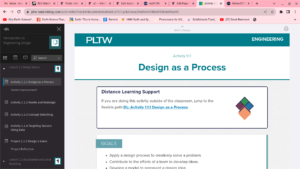
To get started we need to gather some information. Please go to  Activity 1.1.1 Design as a process, see screenshot to the right to make sure that you are in the correct place:

Read through the goals, materials, and then the section Creativity in Design. As you read through this section answer the following questions in your engineering notebook:

  1. Explain what ITERATION is and how you apply iteration to the design process.
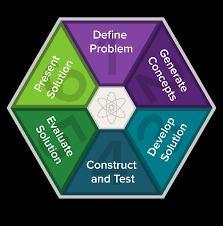
  2. Write down the steps of the DESIGN PROCESS and write a sentence about what happens in each step.
  3. Explain what COLLABORATION is and what collaborating within a team looks like.

Please read over the reminder of the information about this activity and as a class we will discuss teams and get started with the instant challenge.




View Full Page

Tue | Aug 26

Welcome to Class!

We are going to do our Instant Challenge today and review what we learned yesterday about the engineering design process

You will need to get your Engineering Notebooks and we are going to finish answering questions and then review the following:
  1.   What is Iteration and how is it used in engineering?
  2.  Review the Steps in the Design Process
  3.  What is collaboration and what does it look like?
 Click HERE to go to the PLTW website


We will spend the reminder of our class period learning about and starting the Instant Challenge with a partner of your choice.


View Full Page

Wed | Aug 27

Welcome to class! 

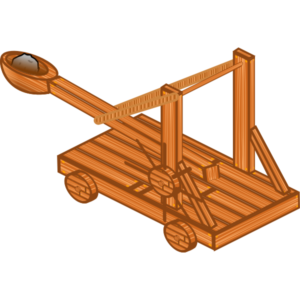
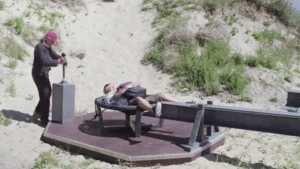
FLING MACHINE project details.

Today we will be working on finishing your design for your fling machine, construct your device making changes as needed, and launch a small beanbag and send it as far as possible.

  • 10 mins or less to finish design
  • 15-20 construct your chosen design
  • Test your design with 10 launces

At the end of class we will discuss how iteration enables us to get the best design to meet challenge criteria.


View Full Page

Thur | Aug 28

Welcome to class!! 

WELCOME TO CLASS!

Today we will.....

  • Finish device construction
  • Gather Data - 10 plotted hits on your target and distance data of 5 measurements and calculate the average distance
  • Work on Slide Show
  • Make sure daily progress is in your portfolio 🙂


View Full Page

Fri | Aug 29 - Early Release

Happy Friday!!  Welcome to class!!  

To end our week let's....

  • Finish what we can of our Fling Machine Project
  • FLING MACHINE project details.
View Full Page

Week 1 | Aug 18 – Aug 22 🏫- Welcome back!!

Mon | Aug 18 ***1st Day 👋***

Welcome to ROBOTICS- Intro to Engineering!!! 

Today's Activities:

  • Beach Bonding - Getting to know your "DREAM TEAM"

  • Team Challenges

  • What do you expect? Give me your top 3 expectations.


View Full Page

Tue | Aug 19

This content is password-protected. To view it, please enter the password below.

View Full Page

Wed | Aug 20

This content is password-protected. To view it, please enter the password below.

View Full Page

Thur | Aug 21

Welcome to Class!!

How do you set up each week in your portfolio?

Progress Report- Engineering Today:  RUBRIC HERE

DUE TODAY: Portfolio Share + Biography/ | RUBRIC HERE

    • Survey is finished
    • You have created your Portfolio
    • Biography is Finished
    • Your picture is included
    • Shared your google site with mooream@tfsd.org

When you are done you can accept the challenge - CABLE CARS

  • Click HERE to get your briefing on this project.
  • Ask Mrs. Moore for supplies.

View Full Page

Fri | Aug 22

Welcome to Class!! 

  • Review objective/rules of this challenge


  • How do you calculate the SPEED of an object?

  • Finish Cable Car Challenge - who's car will be the FASTEST????


View Full Page

Post navigation

Newer posts →

Sidebar Area

  • Add Some Widgets!
    This theme has been designed to be used with sidebars. This message will no longer be displayed after you add at least one widget to one of the Sidebar Widget Areas using the Appearance → Widgets control panel.
    You can also change the sidebar layout for this page using theme options.
    Note: If you have added widgets, be sure you've not hidden all sidebars on the Per Page options. You could switch this page to One Column.
  • Log in
©2026 - Mrs. Moore's Advisory 🙌
↑